
A Practical Guide to Film Scheduling


By Muhammad Wisal and Muhammad Ali / 4 min read

Film scheduling turns a script into shoot days you can actually execute. It decides when scenes are filmed, where the crew goes, which actors are needed, what gear is booked, and how money is spent each day. A clear schedule reduces overtime, cuts waste, and keeps the team aligned.

Timelines - Trusty Old Gantt Charts
Who usually owns the Film Scheduling
On most productions the Assistant Director team drives scheduling. The 1st AD builds and protects the plan with input from the Line Producer/UPM, Production Coordinator, and all department heads. On smaller shoots a Producer or Director-Producer may handle this role. One person must be the single source of truth for changes and call times.
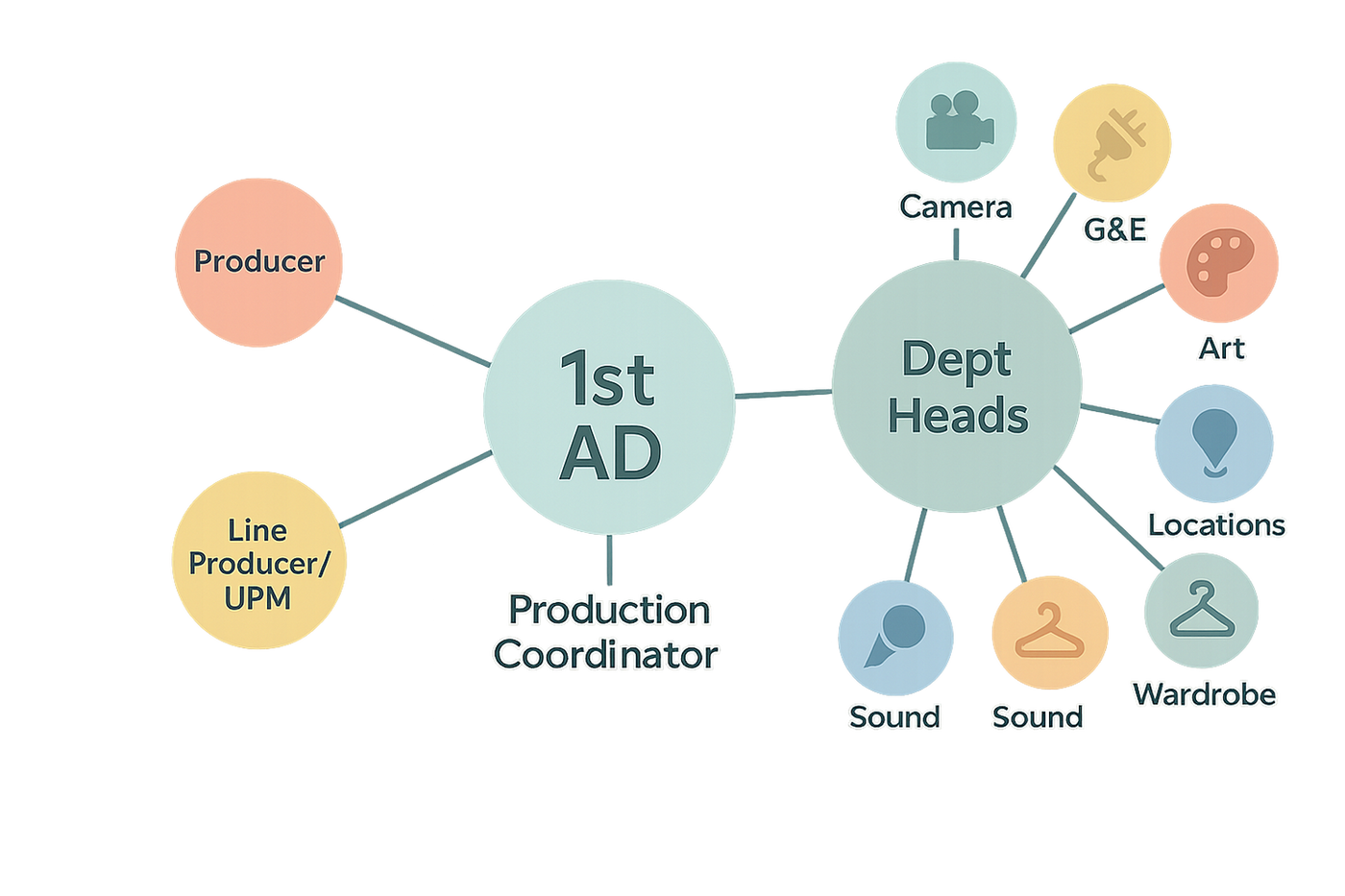
Producer or Director-Producer may handle scheduling
What you need to think about before you schedule
- Scene logistics: INT or EXT, Day or Night, page count, stunts, SFX, VFX, animals, vehicles, kids
- Locations: availability windows, permits, access, company moves
- Cast: availability, union rules, minors and school hours, turnarounds
- Crew and gear: packages and rentals, specialty rigs, delivery and return days
- Budget: overtime risk, night premiums, site reps, police details
- Weather and season: exterior light, cover sets, dawn or dusk needs
What the Lowerated Scheduling module gives you
- Professional timeline: drag and drop scenes and events on a Gantt-style board
- Zoom levels: Hour, Day, Week, Month, Year for daily detail or season planning
- Conflict detection: flags double-booked cast, locations, crew, or gear and suggests fixes
- Recurring events: daily standups, table reads, fittings, dailies
- Multi-schedule views: prep, principal, pick-ups in parallel, or show and season layers for series
- Calendar sync: two-way sync with Google Calendar so teams see updates
- Call sheets: generate shoot-day call sheets directly from the schedule
- Live links to other modules: pulls scenes from breakdowns, talent from casting, windows from scouting, rentals from inventory, and pushes day-count data to budgeting

Set Your Availability and the Schedule will respect that
Build a working schedule in an afternoon
1) Start from the script for Film Scheduling
Sync scenes from your breakdown. The system brings in scene numbers, INT/EXT, DAY/NIGHT, location, page count, and complexity. That gives you default durations and a clean list to place.

Write your script as you do, Lowerated will extract the info
2) Group by location and time of day
Place scenes that share a location and lighting need on the same day if possible. This cuts company moves and relights in your Film Scheduling.
3) Layer in cast availability
Turn on talent filters. Scenes highlight green when the needed actors are available. Conflicts appear in red with a quick suggestion to swap or slide.
4) Watch the crew and gear lanes
Add lenses, rigs, and specialty items as resources. The schedule warns you if a crane, drone, or steadicam is already booked on another unit.
5) Lock days, then refine hours
Once the day order is set, move to the Day zoom. Place setups with realistic buffers, meal breaks, and turnarounds. Add holds and travel time.
6) Generate a one-liner and DOODs
Create a one-liner for producers and a Day-Out-Of-Days for cast and key items. These reports update as you adjust the plan.

Hey Dude, Look at the DOODs
Keeping the plan clean during prep and shoot
- Use status tags: tentative, pencil, firm, locked
- Limit company moves: one move can erase hours
- Plan resets: blood, food, rain, breakaways add reset time
- Protect lunch and turnarounds: morale and overtime both improve
- Hold backups: a cover set for weather or a silent interior for noisy days
- Review risks daily: run conflicts at the end of each prep day
Call sheets from the schedule in one click
When a day is locked, generate the call sheet. Lowerated pulls:
- Scenes and page counts for the day
- Cast call times and scenes by actor
- Location address, maps, access notes, parking
- Crew call by department
- Gear highlights and special notes
- Weather and sun path
- Safety and medical info
- Attachments like sides and maps

Bruh AI is crazy - Call Sheets btw
Calendar and communication
Sync the schedule to Google Calendar so cast and crew see their call times and location details. Edits in LOWERATED update calendars for everyone you invite. Keep sensitive notes inside the platform and use calendar summaries for the basics.
Series planning
Use Month or Year zoom to map season arcs, hiatus, and pick-ups. Keep multi-schedule views to compare the writers’ plan, production plan, and actuals. Reuse standing sets and track return-to-set days by episode.
How scheduling connects to money
Every move on the schedule can change cost. LOWERATED sends counts and day changes to Budgeting so you see:
- Location days and site rep totals
- Gear rental days and overtime risk
- Night premiums and weekend work
- Cast and crew day changes
This keeps producers in the loop without a separate reconciliation.
Common scheduling mistakes to avoid
- Building without a one-liner or a real script breakdown
- Stacking too many scenes on a single day
- Ignoring actor or minor turnarounds
- Underestimating resets and company moves
- Skipping a cover set for exterior days
- Sending call sheets before the day is actually locked
Checklists you can copy
Before you start
- Script breakdown synced
- Location windows confirmed
- Key cast availability windows in hand
- Gear constraints known
- Budget flags noted: nights, stunts, vehicles, kids
While you build
- Group by location and time of day
- Place high-risk scenes earlier in the day
- Limit moves and protect lunch
- Run conflict check after each change
Before you publish
- Day status set to Locked
- Call sheet generated and reviewed
- DOODs (Day-Out-Of-Days reports) and one-liner exported
- Calendar sync sent
- Backup plan written for exteriors
Where Lowerated saves you time
- Drag-and-drop timeline with Hour to Year zoom for daily detail and long-range planning
- Conflict-aware scheduling across cast, locations, crew, and gear
- Smart recurrence for meetings, dailies, fittings, rehearsals
- Live integrations with breakdowns, casting, scouting, inventory, and budgeting
- Instant call sheets and clean exports: one-liner, DOODs, calendars

yay, perfect schedule
Final note
A schedule is a living plan. Build it from the script and the real limits you face, check conflicts early, hold a backup for risky days, and keep communication tight. Lowerated gives you the timeline, the conflict checks, the calendar sync, and the call sheets so you can run a smooth prep and a focused shoot.


