Celtx Alternatives for Screenwriters and Producers


By Muhammad Wisal and Muhammad Ali / 6 min read
The right Celtx alternative depends on which part of Celtx you use. If you only write scripts, WriterDuet, Arc Studio, Fade In and Final Draft are strong replacements, and Trelby and STARC are free. If you also use Celtx for breakdowns, schedules and call sheets, you need a tool that covers production planning too, such as StudioBinder or Lowerated, or a writing app paired with a separate scheduling tool.
Why do people look for a Celtx alternative?
Most people switch for one of three reasons: the free plan is too small, the production tools cost more than they expected, or they want a desktop app that works offline. As of 2026, Celtx is a browser-based studio. Its free plan allows one project and one seat, and script history is read-only. Paid writing plans (Writer and Writer Pro) raise the project limit, while breakdowns, scheduling, budgets and call sheets come with the Team plan or as paid add-ons. Prices change often, so check the Celtx pricing page before you decide.
None of this makes Celtx a bad choice. It suits teams who want writing and production in one subscription and are happy working in a browser. The alternatives below suit people with different priorities.
What should you check before you switch?
Before you move a project, answer four questions. They narrow the list fast.
- Do you need production tools, or only a script editor? A writer working alone has very different needs from a producer running a 15 day shoot.
- Do you co-write? Real-time co-writing is common in cloud tools and rare or extra-cost in desktop tools.
- One-time purchase or subscription? Final Draft and Fade In sell licenses. Most cloud tools are subscriptions.
- Can you get your scripts out? Export your Celtx scripts to PDF before you cancel, and check which formats the new tool imports. Final Draft (.fdx), Fountain and PDF are the formats most tools accept.
Which Celtx alternatives are best for screenwriters?
If you write and someone else (or nobody yet) handles production, pick from these. Prices and plans are as of 2026.
| Tool | Price model | Platforms | Best for |
|---|---|---|---|
| Final Draft 13 | One-time license or annual and monthly subscription | macOS and Windows; separate iOS app | Writers who want the format most studios and agencies exchange (.fdx) |
| Fade In | One-time license (around $80); optional cloud subscription | Windows, macOS, Linux | Writers who want a full desktop app for a low one-time price |
| WriterDuet | Free plan (3 projects); paid tiers from about $10 a month | Browser; desktop app on paid plans | Writing partners and writers' rooms who co-write live |
| Arc Studio | Free plan (2 scripts, watermarked PDF); paid from $69 a year | Browser; desktop and iPhone/iPad on paid plans | Writers who want a clean, modern editor with outlining |
| Trelby | Free, open source | Windows, Linux | Writers who want a free offline app with no account |
| STARC (Story Architect) | Free plan with unlimited projects; paid Pro and Creator tiers | Desktop and mobile | Writers on a zero budget who still want outlining and character tools |
A few notes on fit. Final Draft is the safest choice if you send scripts to producers who expect .fdx files. Fade In imports and exports .fdx too, so it works in the same pipeline for much less money. WriterDuet is the usual pick for co-writers. Trelby is dated in look but free and offline. If you are weighing Final Draft specifically, see our Final Draft alternatives guide.
Which Celtx alternatives also handle production?
If you used Celtx for breakdowns, scheduling and call sheets, a script-only app will leave a gap. You have three options.
- An all-in-one production platform. StudioBinder and Lowerated both connect a script to breakdowns, schedules, shot lists and call sheets. StudioBinder has a free plan and paid plans aimed at production companies and agencies. Lowerated is aimed at independent filmmakers and covers script through casting, call sheets and a film page.
- A writing app plus dedicated scheduling and budgeting software. Larger productions often write in Final Draft and schedule and budget in Movie Magic Scheduling and Movie Magic Budgeting. This is the traditional studio setup and costs more.
- A writing app plus spreadsheets. Cheap and flexible, but every script change has to be copied by hand into the breakdown, schedule and call sheet. Our comparison of a planner tool and a spreadsheet covers the tradeoff.
How do you choose the right Celtx alternative?
Match the tool to the job you do most. Here are four common cases.
- Solo writer, no budget: Trelby or STARC on desktop, or the free tier of WriterDuet or Arc Studio in a browser. Check the free tier limits before you start a long project.
- Writing team on a TV pilot: WriterDuet or Arc Studio for live co-writing and comments.
- Writer sending scripts to industry readers: Final Draft, or Fade In if you want a one-time price and .fdx compatibility.
- Writer-director making their own short or feature: an all-in-one tool, so the script feeds the breakdown, schedule and call sheets directly. Read what an all-in-one filmmaking platform does for the details.
How do you move your scripts out of Celtx?
Export each script before your plan changes or you cancel. A safe sequence:
- Export every script as PDF. This is your reference copy and works with any tool that imports PDF.
- Export in a structured format too if your plan allows it (Fountain or Final Draft), because structured files keep scene headings, characters and dialogue as separate elements.
- Import into the new tool and check the first ten pages by eye: scene headings, character cues, parentheticals and transitions are the elements most likely to land in the wrong place.
- Export any breakdown, schedule or budget reports you rely on as PDF or spreadsheet before you lose access.
Our guide on importing a Final Draft, Fountain or PDF script walks through checking an import.
How does Lowerated compare as a Celtx alternative?
Lowerated is an all-in-one platform for independent filmmakers that takes a project from idea and screenplay through pre-production, casting, call sheets and a film page. It imports Final Draft, Fountain, Celtx and PDF scripts, so you can bring existing work across.
The script editor formats to industry standard as you type, supports live co-writing with comments, keeps drafts and revisions with revision colors, and exports a clean PDF. Oli, the AI writing partner, rewrites only the line you select, and nothing changes until you accept. On the production side, the script breakdown is built from the screenplay, the stripboard schedule warns about availability clashes, and call sheets are built from the schedule.
What it does not do: Lowerated does not edit video or handle color, sound or VFX, and it offers no agency or writing services. Plans as of 2026: Basic is free, Scriptwriter is $10 a month, Producer is $30 a month (storyboards, shot lists, casting and self-tapes, location scouting, budgeting and scheduling, mood boards), and both together are $40 a month. See pricing for the current details.
The clip gives an overview of Lowerated, from writing the script to planning the shoot.
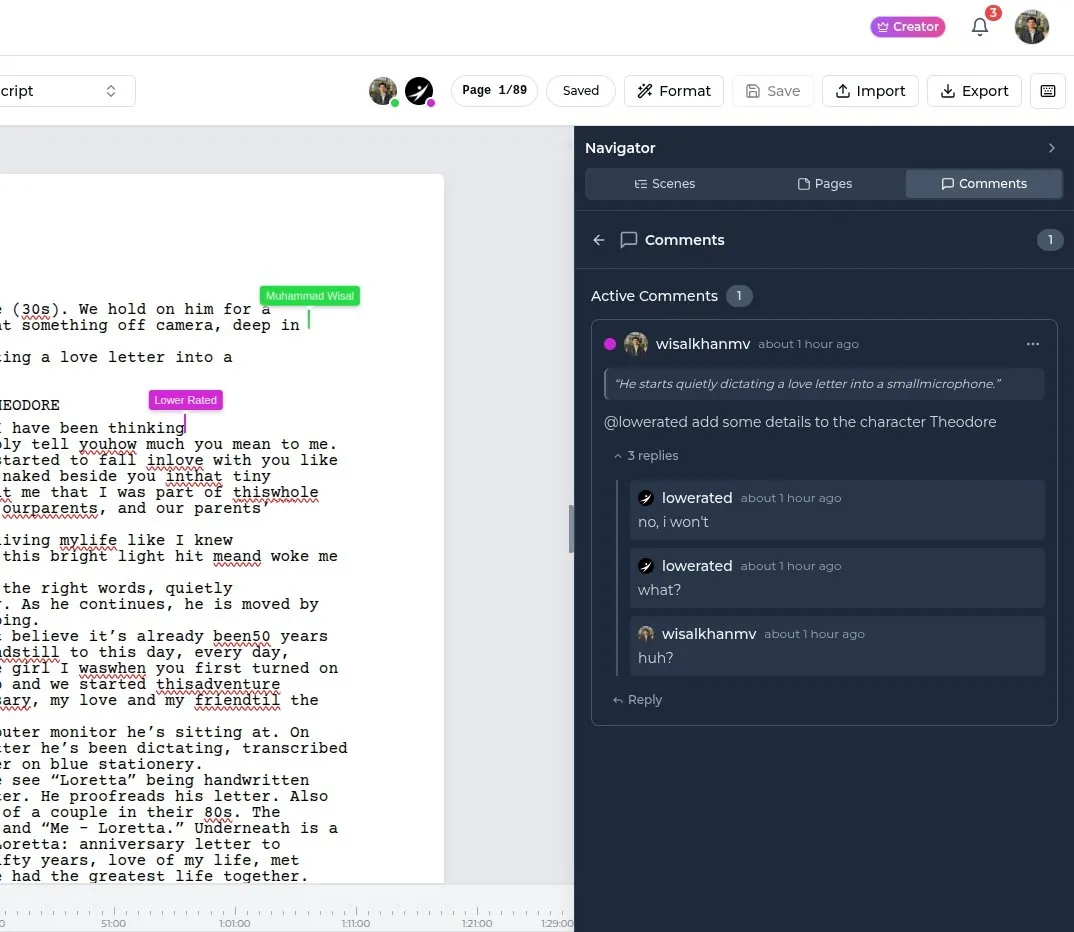
A scene being written in the Lowerated editor, formatted as you type.
FAQ
Is there a free alternative to Celtx?
Yes. Trelby and STARC have free versions with no project limit, and WriterDuet and Arc Studio have free tiers with a small number of scripts. Free tiers usually limit projects, collaboration or watermark-free PDF export.
Can I open Celtx scripts in other software?
Export from Celtx as PDF, and as Fountain or Final Draft where your plan allows. Most screenwriting tools import those formats. Lowerated also imports Celtx files directly.
What is the best Celtx alternative for production planning?
One that builds the breakdown and schedule from the script, so changes flow through. StudioBinder and Lowerated both work this way. Studio productions often use Movie Magic Scheduling and Budgeting alongside a separate writing app.
Is Final Draft better than Celtx?
For pure writing and industry file exchange, many writers prefer Final Draft. For writing plus production planning in one place, Celtx covers more ground. It depends on which job you need done.
Key takeaways
- Decide first whether you need a script editor or a writing and production tool.
- For writing only, look at Final Draft, Fade In, WriterDuet, Arc Studio, Trelby and STARC.
- For production too, look at all-in-one platforms such as StudioBinder or Lowerated, or pair a writing app with dedicated scheduling software.
- Export every script as PDF plus a structured format before you cancel.
- Check prices on each vendor's site, since plans change often.