Script Tagging: How to Tag a Script for Breakdown


By Muhammad Wisal and Muhammad Ali / 7 min read
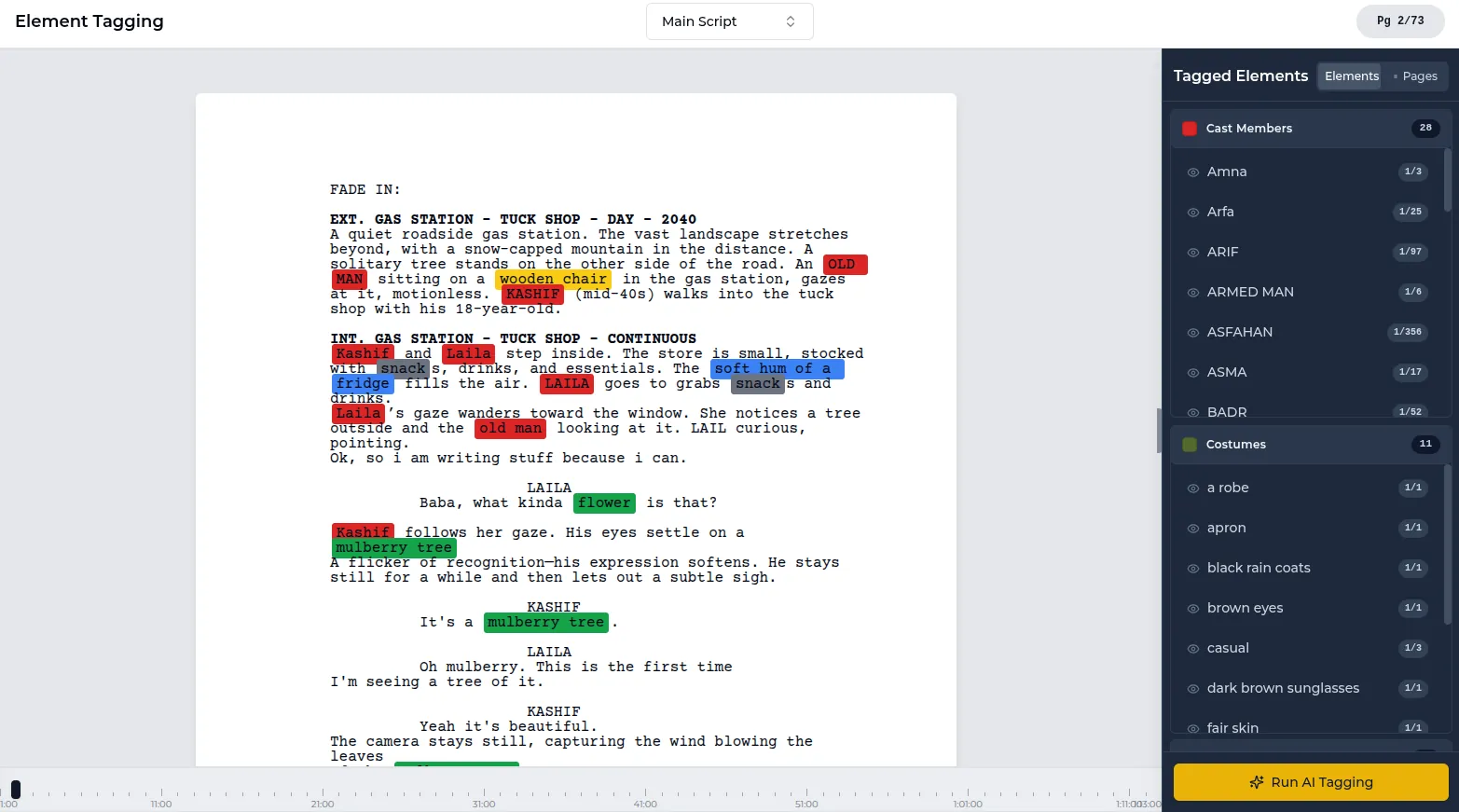
Script tagging is marking every production element in a screenplay (cast, extras, props, wardrobe, vehicles, effects and so on) by category, so each scene's needs can be pulled into a breakdown. To tag a script, lock a numbered draft, read it once without marking, then go scene by scene and tag every element, including the ones the action only implies.
What is script tagging?
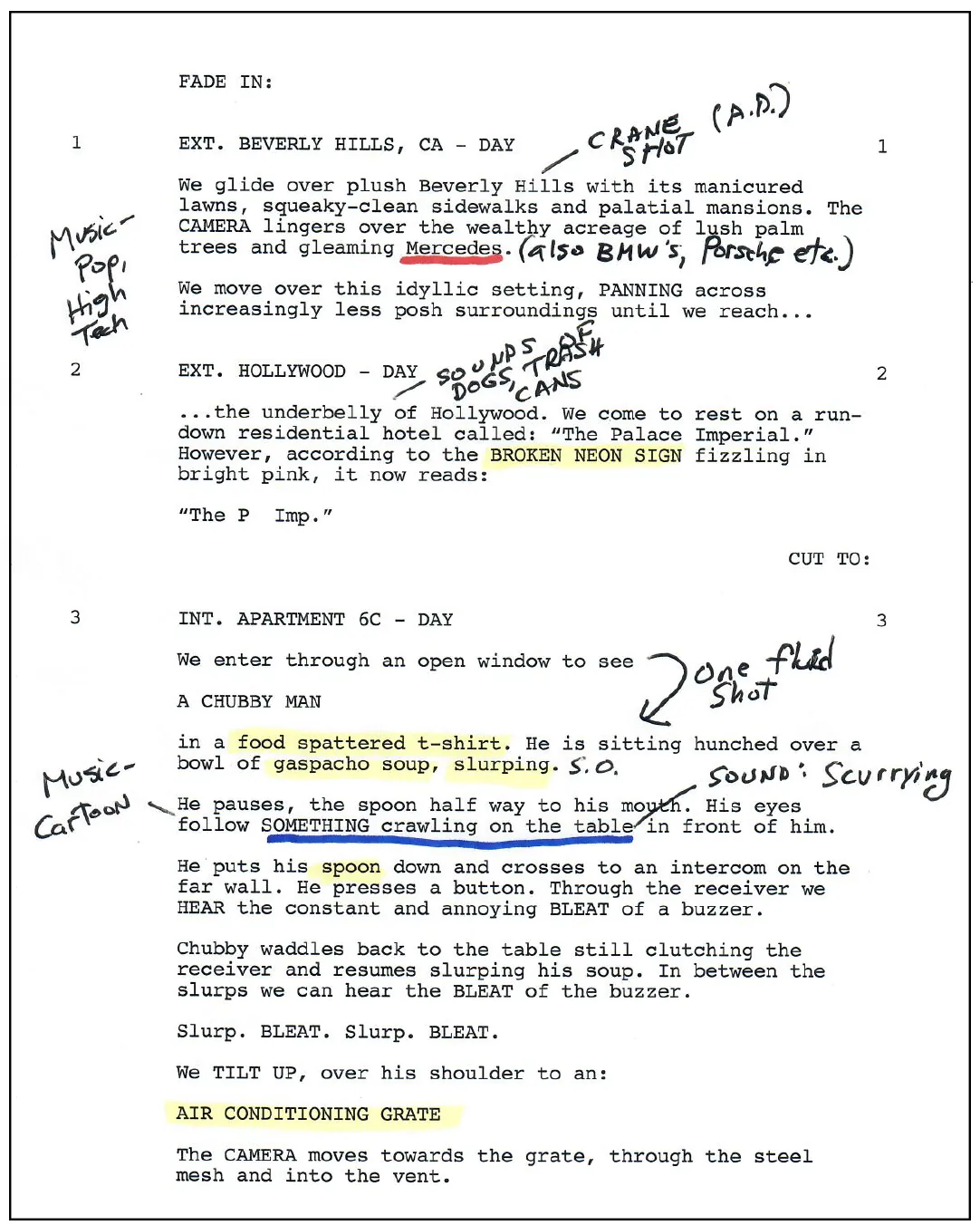
Script tagging is the first hands-on step of a script breakdown. You go through the screenplay and mark each word or phrase that something on set depends on: a character who must be cast, a gun that props must source, a dress that wardrobe must duplicate, rain that special effects must make. Each tag belongs to a category, and the categories become the sections of a breakdown sheet.
On paper, this was done with colored pencils or highlighters, one color per category. In breakdown software, you select a word and assign it a category. Either way the goal is the same: nothing the shoot needs should exist only inside a sentence of action.
Who tags the script, and when?
The 1st AD or the line producer usually does the main breakdown, often with a production coordinator or scheduler helping. Department heads then go through the script again for their own area. The costume designer tags wardrobe in more detail, the prop master tags props, and so on.
Tagging happens after the script is locked for production and the scenes are numbered. If you tag a draft that is still changing, you will tag it again. When revisions do come in later, tag only the changed pages and update the breakdown to match.
What are the script tagging categories and colors?
There is no single official standard, but many productions use a convention like the one below. Software tools often use their own colors. What matters is that everyone working on the breakdown uses the same key.
| Category | Common mark | What to tag | Example |
|---|---|---|---|
| Cast | Red | Any character with lines or a specific action | CORINNE, the night clerk |
| Stunts | Orange | Falls, fights, car hits, anything needing a coordinator | He is shoved over the counter |
| Extras (silent bits) | Yellow | Background who do a specific action | A trucker pays for gas |
| Extras (atmosphere) | Green | General background | Diners at three booths |
| Special effects | Blue | Practical effects on set | Rain, smoke, a sparking fuse box |
| Props | Purple | Anything an actor handles | Ledger, lighter, cash bag |
| Vehicles and animals | Pink | Picture cars, animals and their handlers | Rusted tow truck, a dog |
| Sound effects and music | Brown | Sounds or music played or needed on set | Jukebox plays, phone rings |
| Wardrobe | Circle | Specific costumes and costume changes | Rain-soaked jacket |
| Makeup and hair | Asterisk | Wounds, aging, special looks | Split lip |
| Special equipment | Box | Gear beyond the standard package | Crane, underwater housing |
| Production notes | Underline | Questions or anything that needs a decision | Real fire or VFX? |
Add categories when your film needs them: set dressing, greenery, weapons, VFX, or a custom one such as "practical lights" on a film full of lamps and neon.
How do you tag a script step by step?
- Lock and number the script. Work from the production draft with scene numbers, so every tag maps to a fixed scene.
- Read it once without marking. You need the whole story in your head to catch things like a costume that has to be torn in scene 30 but clean in scene 12.
- Number the cast. Give each speaking character an ID, usually in order of importance (lead is 1). These numbers are used on the stripboard, the one-liner and the call sheets.
- Tag scene by scene. Read the scene heading, then the action and dialogue, and tag every element by category. Tag the first mention in each scene even if the element appeared earlier.
- Tag what is implied. "She lights a cigarette" means cigarettes and a lighter. "They come in from the storm" means wet wardrobe, probably duplicates, and maybe rain outside the window.
- Note continuity. Mark the scene where a costume changes, an injury appears, or a prop gets broken, so departments know which version is needed when.
- Measure page counts. Record each scene's length in eighths of a page for scheduling.
- Transfer to breakdown sheets. One sheet per scene, with every tagged element listed under its category.
What does a tagged scene look like?
Here is a short scene from "Back Lot", a short film about a gas station clerk on her last night shift.
INT. GAS STATION SHOP - NIGHT
CORINNE (40s) counts the register into a canvas cash bag. Rain hammers the windows. The radio plays a slow country song.
A tow truck pulls up outside, headlights flaring. HOLLIS (60s), drenched, shoves through the door and drops a set of keys on the counter.
HOLLIS: Your brother's car. It's in the ditch on Route 9.
Tagged, the scene breaks down like this:
| Category | Elements |
|---|---|
| Cast | 1. Corinne, 2. Hollis |
| Props | Cash register with cash, canvas cash bag, set of keys |
| Vehicles | Tow truck (exterior, through windows) |
| Special effects | Rain on windows |
| Wardrobe | Hollis: soaked coat, with a dry duplicate for resets |
| Sound and music | Radio song (needs clearing or a playback plan) |
| Special equipment | Lights to suggest headlights if the truck cannot be lit on cue |
| Production notes | Is the radio song licensed or replaced in post? |
Four lines of script produced eight categories of work. That is why careful tagging saves money: each of these items would otherwise surface on the day.
What are common script tagging mistakes?
- Tagging only nouns and missing implied needs, such as wet costumes, blood, or a broken prop that needs spares.
- Tagging a character name once per script instead of in every scene they appear, which leaves holes in the cast list per day.
- Using different names for one element ("the bag", "cash bag", "deposit bag"), so it appears as three props.
- Tagging a draft that is still changing, then not updating tags when revised pages come in.
- Skipping production notes. Open questions should be tagged so they get answered at the production meeting.
What happens after the script is tagged?
Tagging feeds every planning document that follows. The tagged elements become the script breakdown. Props tags become the prop list, and wardrobe tags start the costume breakdown. Scene, cast and page data go onto the stripboard to schedule the shoot, and from there to the one-line schedule, day out of days and call sheets.
How to tag a script for breakdown in Lowerated
In Lowerated, you tag elements directly in the screenplay, and the breakdown is built from those tags.
- Import or write your script. You can import Final Draft, Fountain, Celtx or PDF files, or write in the scriptwriter.
- Let Oli do a first pass. Oli, the AI writing partner, can make a first tagging pass across the script for you to check.
- Tag and correct elements. Choose from 21 element types or add custom ones. Tag a word once and every mention of it is tagged.
- Review the breakdown. The script breakdown (cast, props, wardrobe, locations) is built from the tagged screenplay. Review and adjust it before scheduling.
The clip shows breakdown tagging inside a Lowerated script.
Tagging is part of the scriptwriter, and the breakdown it feeds sits with the pre-production tools. Automatic tagging still needs a human pass, especially for implied elements like the soaked coat above.
FAQ
Is script tagging the same as a script breakdown?
Tagging is the marking step. The breakdown is the organized result: a list of elements per scene, usually on breakdown sheets.
Do I have to use the standard colors?
No. Colors vary between productions and software. Pick a key, share it, and keep it the same for the whole project.
How long does it take to tag a feature script?
It depends on the script's complexity and how much detail each department needs. Budget at least a few full working days for a careful first pass on a feature.
Should I tag every mention of a prop?
Tag it in every scene where it appears, because each scene gets its own breakdown sheet. Within a single scene, one tag is enough.
Key takeaways
- Script tagging marks every production element in the screenplay by category so it can go into the breakdown.
- Lock and number the script first, read it once, then tag scene by scene.
- Tag what the action implies, such as duplicates, effects and continuity changes.
- Use one consistent name and one color key for each element across the project.
- Tagged elements feed the breakdown sheets, prop and costume lists, stripboard and call sheets.