How to Format a Screenplay (Rules, Margins and Title Page)


By Muhammad Wisal and Muhammad Ali / 7 min read
To format a screenplay, write on US Letter pages in 12 point Courier, with a 1.5 inch left margin and 1 inch margins on the other three sides, and place each element (scene heading, action, character, parenthetical, dialogue, transition) at its standard indent. Add a plain title page with the title, your name and contact details. Done correctly, one page runs about one minute of screen time.
Why does screenplay format matter?
Screenplay format matters because the whole production also uses the script as a measuring tool. A fixed font, fixed margins and fixed indents make one page roughly equal to one minute, so producers can estimate running time and assistant directors can measure scenes in eighths of a page for the schedule. A reader who opens a script with odd fonts or margins also assumes the writer has not done the basics, and may stop reading.
Format does not make a story good. It removes friction so the story is the only thing a reader judges.
What are the page, font and margin rules?
The standard page setup for a US spec screenplay is the same in every professional screenwriting program. Small differences between programs (a tenth of an inch here or there) are normal and nobody will notice them.
| Setting | Standard |
|---|---|
| Paper | US Letter, 8.5 x 11 inches (A4 is common in the UK and Europe, but most US readers expect Letter) |
| Font | Courier or a Courier variant such as Courier Prime, 12 point |
| Left margin | 1.5 inches, which leaves room for binding brads |
| Right, top and bottom margins | 1 inch each |
| Line spacing | Single spaced, with one blank line between elements |
| Page numbers | Top right, followed by a period ("2."). No number on page one or the title page |
| Lines per page | About 55, which is what keeps the page close to one minute |
Courier matters because every character is the same width. Change the font and the page count, and with it the timing estimate, stops meaning anything. For more on what page counts tell you, see how long a screenplay should be.
Where does each screenplay element go?
Each element sits at a fixed distance from the left edge of the page. The figures below are the common defaults, measured from the paper edge.
| Element | Left indent | Rules | Example |
|---|---|---|---|
| Scene heading | 1.5 in | All caps. INT. or EXT., location, time of day | INT. BUS DEPOT, TICKET OFFICE - NIGHT |
| Action | 1.5 in, runs to 7.5 in | Present tense, what we see and hear. Character names in caps the first time they appear | PRIYA (40s, night clerk) counts coins into a cash bag. |
| Character cue | About 3.7 in | All caps, above the dialogue. Extensions in brackets | PRIYA (V.O.) |
| Parenthetical | About 3.1 in | Short, lowercase, only when the line would be misread without it | (not looking up) |
| Dialogue | About 2.5 in, around 3.5 in wide | What the character says, no quotation marks | Last bus left at ten. |
| Transition | Right side, ending at 7.5 in | All caps, used sparingly | CUT TO: |
Scene headings are often called sluglines. The guide to scene headings covers the variations (CONTINUOUS, LATER, sub-locations), and the guide to transitions, parentheticals and other elements covers the rest.
What does a correctly formatted scene look like?
Here is a short scene written to the rules above. On the page, the cue, parenthetical and dialogue are indented to their positions; the notes on the right show where each line sits.
| Line on the page | Element |
|---|---|
| INT. BUS DEPOT, TICKET OFFICE - NIGHT | Scene heading, 1.5 in |
| Fluorescent tubes buzz. PRIYA (40s, night clerk, cardigan over her uniform) counts coins into a cash bag. A knock on the glass. | Action, 1.5 in |
| Outside stands TOMASZ (19), soaked, a duffel bag over one shoulder. | Action, 1.5 in |
| TOMASZ | Character cue, 3.7 in |
| One to Duluth. | Dialogue, 2.5 in |
| PRIYA | Character cue, 3.7 in |
| (not looking up) | Parenthetical, 3.1 in |
| Last bus left at ten. | Dialogue, 2.5 in |
| He doesn't move. She looks up. He's younger than she thought. | Action, 1.5 in |
| CUT TO: | Transition, right side |
Notice that Priya and Tomasz are in caps only the first time they appear in action. After that their names are in normal case.
How do you format a screenplay title page?
A screenplay title page is plain: title, credit line, author, and contact details, all in the same 12 point Courier as the script. There is no artwork, no logline and no page number.
- Title. Centered, about a third of the way down the page, in caps. Underlining or bold is optional.
- Credit line. Two lines below the title, centered: "Written by" (or "Screenplay by" for an adaptation).
- Author name. One or two lines below the credit, centered. Co-writers who wrote as a team are joined with an ampersand ("Lena Ortiz & Kofi Mensah"); writers who worked separately are joined with "and".
- Source material, if any. "Based on the novel by..." a few lines below the author.
- Contact details. Bottom left or bottom right: your name or your representative's, email and phone number.
- Draft date. Optional on a spec. On production drafts the date and revision color usually go at the bottom.
Leave off copyright symbols, WGA registration numbers and "first draft" labels on a spec script. They signal inexperience to many readers.
How do you handle dialogue across a page break?
When a speech has to break across pages, end the first part with (MORE) under the dialogue and start the next page with the character's name and (CONT'D). Break at the end of a sentence, never in the middle of one. Screenwriting software does this for you; in a word processor you have to do it by hand, which is one of the main reasons people move to dedicated software.
The same (CONT'D) extension is sometimes added when a character speaks twice in a row with only action between. Many current writers skip it in that case. Pick one style and keep it consistent.
What are the most common formatting mistakes?
- Camera directions. "We see", "CLOSE ON" and "PAN TO" are the director's job in a spec script. Write what happens and let the shot choice follow.
- Long action blocks. More than four lines of action in one paragraph slows the read. Break it up by beat.
- Too many parentheticals. If every line has one, cut most of them. Trust the actor and the dialogue.
- Scene numbers on a spec. Scene numbers are added for the shooting script, when the production locks scenes for scheduling.
- Cheating the margins. Shrinking margins or line spacing to hit a page count is easy to spot and makes the timing estimate wrong.
- Inconsistent names. "MR. HALE" in one scene and "DANIEL" in the next confuses readers, and later confuses the script breakdown.
How to format a screenplay in Lowerated
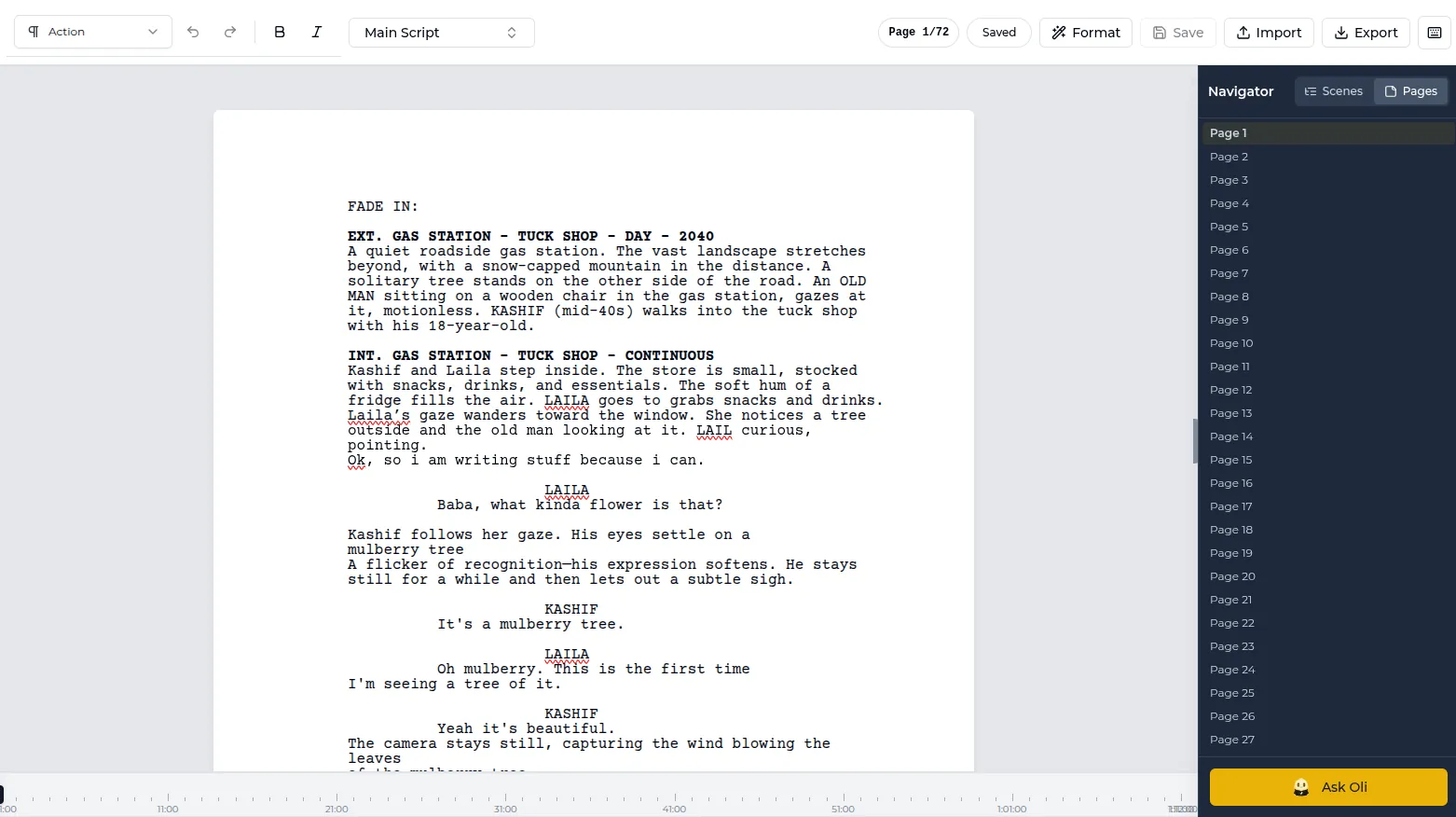
The Lowerated scriptwriter applies industry-standard formatting as you type, so you write the scene and the margins and indents take care of themselves.
- Start a script or import one. Begin a new screenplay, or import an existing Final Draft, Fountain, Celtx or PDF file. See how to import a script.
- Write. Type a scene heading, action, a character and dialogue. Each element is placed at its standard position as you go.
- Fill in the title page. Add the title, credit and contact details on the title page.
- Export a clean PDF. Send the PDF to readers, contests or your producer.
A scene being written in the Lowerated editor, formatted as it is typed.
The clip shows a finished screenplay exported to a clean PDF from Lowerated.
The editor is part of the scriptwriter for filmmakers. You can sign up and write your first pages on the free plan.
FAQ
Can I write a screenplay in Microsoft Word or Google Docs?
Yes, with a template and a lot of manual work on indents and page breaks. Dedicated screenwriting software handles (MORE), (CONT'D) and element spacing automatically.
Do I need to use Courier?
For any script you send to a reader, producer or contest, yes. Courier Prime and similar Courier variants are accepted.
Should I number scenes in my script?
Not in a spec script. Scene numbers are added to the shooting script before pre-production starts.
Is TV formatted the same way?
Hour-long dramas mostly follow film format, with act breaks marked. Multi-camera sitcoms use a different format with double-spaced dialogue and capitalized action, so check the show's own scripts.
Key takeaways
- Use US Letter, 12 point Courier, a 1.5 inch left margin and 1 inch on the other sides.
- Each element has a fixed indent; consistency is what keeps one page close to one minute.
- Keep the title page plain: title, credit, name and contact details.
- Leave camera directions, scene numbers and copyright notices out of a spec script.
- Screenwriting software that formats as you type saves you from fixing indents by hand.