
Filmmaker Collaboration Platforms For Creators: Complete Guide | All-in-One Filmmaking Platform


By Muhammad Wisal and Muhammad Ali / 4 min read

Filmmaking is no longer a one-person craft. Modern creators, from indie filmmakers to YouTubers and digital storytellers, rely on collaboration to bring ideas to life. But despite having ideas, talent, and passion, most creators struggle with something critical: finding the right people, resources, and tools to collaborate effectively.
This is why Filmmaker Collaboration Platforms have become a game-changing necessity for creators today. They connect writers, directors, editors, producers, and content creators in one place while offering the digital tools required to plan, write, and produce films faster.
And with the rise of AI-powered tools like AI Script-Writer, AI Idea Generator, and Filmmaking Planner Tool, collaboration has become easier, smarter, and more accessible for creators at every level. AI-powered creative collaborators like invideo agent are also helping filmmakers maintain project context, organize creative assets, and support iterative workflows throughout production.
This complete guide walks you through why collaboration platforms matter, the problems they solve, and how an All-in-One Filmmaking Platform like Lowerated empowers creators to work better together.
Why Filmmakers Today Need Collaboration Platforms | All-in-One Filmmaking Platform
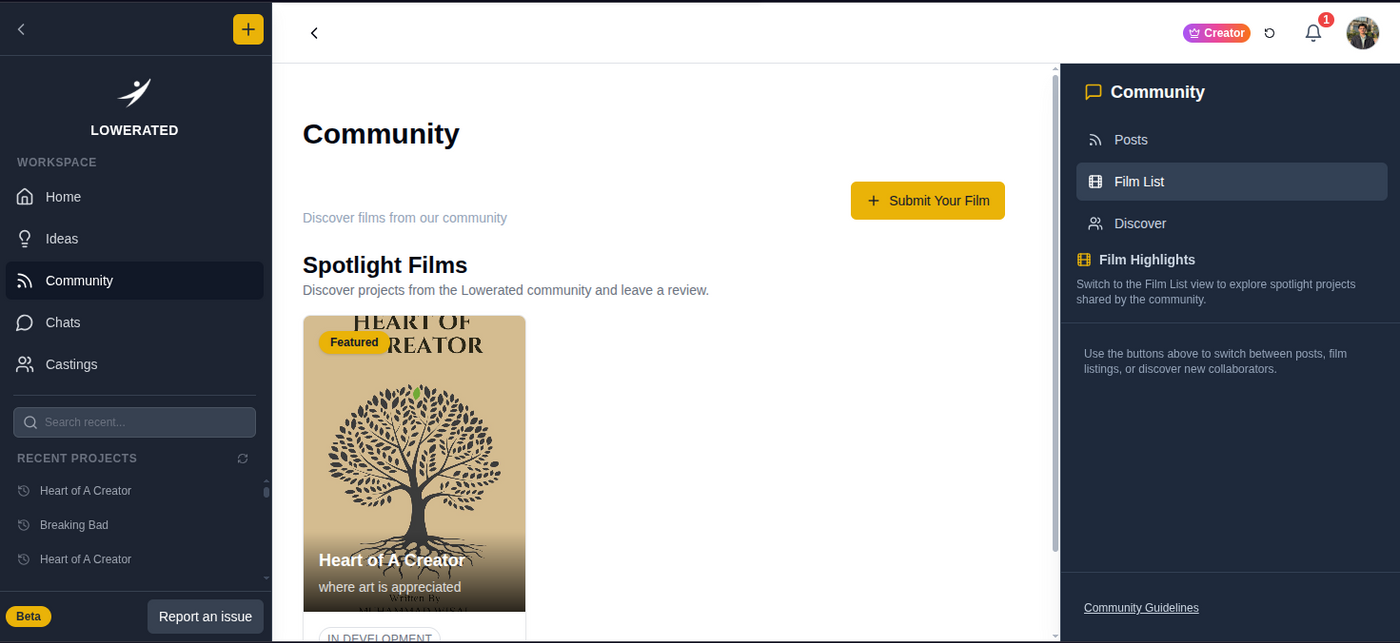
The filmmaking process has become faster, more digital, and more competitive. While creators want to produce more content, the biggest challenges are:
- Limited access to skilled collaborators
- Miscommunication during production
- Slow scriptwriting and idea development
- Difficulty managing remote teams
- Lack of affordable tools
- Disorganized production planning
A Filmmaker Collaboration Platform solves these problems by creating a shared space where creators collaborate, plan, and execute as a team.
The Real Problems Filmmakers & Creators Face Today
Most creators are not struggling because of a lack of ideas; they struggle because of:
1. Creative Roadblocks; Why You Need an AI Idea Generator
Creative block is one of the biggest bottlenecks in filmmaking.
Creators often face:
- Repetitive plot ideas
- Difficulty shaping unique concepts
- Too many ideas but no direction
- No feedback to validate concepts
An AI Idea Generator helps creators break through this block by generating fresh concepts, character arcs, story beats, genres, and creative directions instantly. Combined with collaboration, these ideas turn into real scripts faster.
2. Slow Scriptwriting & No Feedback Loop – Enter AI Script-Writer
Writing a script can take weeks, or even months, when done alone.
Creators often struggle with:
- scene structure
- pacing
- dialogue
- formatting
- consistency
- writer’s block
An AI Script-Writer speeds up the process, helps creators draft scenes instantly, and supports rewriting or refining dialogue. When combined with a collaboration platform, creators can share drafts with peers, receive feedback, and improve scripts quicker.
3. Poor Production Planning Without a Filmmaking Planner Tool
Even a great script fails when production planning is weak.
Creators face:
- chaotic scheduling
- no clear shot list
- misaligned cast and crew
- confusion about locations
- budget overruns
A Filmmaking Planner Tool simplifies:
- scheduling
- scene breakdowns
- production timelines
- budget planning
- task assignments
When creators collaborate inside the same system, planning becomes coordinated and predictable.
4. Working Alone Slows Down Growth
Creativity thrives in collaboration, yet many filmmakers still work alone.
Without a creative community, creators face:
- slow learning
- limited feedback
- no networking
- difficulty building a team
- lack of support
- low motivation
A Filmmaker Collaboration Platform solves this by connecting creators with others who share their passion and creative goals.
What Is a Filmmaker Collaboration Platform?

It’s a digital space where creators:
- Work together on film projects
- Share scripts, ideas, and storyboards
- Ask for feedback
- Collaborate with writers, editors, DPs, and more
- Learn from experts
- Discover opportunities
- Find team partners for upcoming projects
Think of it as a filmmaking ecosystem; one that combines community + tools + workflow + collaboration.
And platforms like Lowerated take this a step further by integrating collaboration with an All-in-One Filmmaking Platform, allowing creators to turn ideas into final films using AI-powered tools.
Key Features That Make Filmmaker Collaboration Platforms Essential

1. Real-Time Collaboration
Creators can work together on:
- story ideas
- script drafts
- shot lists
- production plans
- creative decisions
Real-time collaboration eliminates delays and ensures every team member stays aligned.
2. In-Platform AI Tools for Faster Creation
With tools like:
- AI Idea Generator
- AI Script-Writer
- Filmmaking Planner Tool
Creators don’t need 5–10 different apps to finish a project. Everything happens in a single platform.
3. Centralized Workspace
Instead of managing:
- WhatsApp messages
- Google Docs
- PDFs
- Notebooks
- Excel sheets
- Voice notes
…a collaboration platform brings everything into one organized workspace.
4. Community Support & Feedback
Creators get access to:
- peer reviews
- industry insights
- creative advice
- script suggestions
- production tips
- networking opportunities
This speeds up learning and improves the quality of creative output.
5. Secure File Sharing
Film projects involve sensitive content. Collaboration platforms ensure safe, encrypted sharing of:
- scripts
- treatments
- production plans
- storyboards
- assets
How an All-in-One Filmmaking Platform Enhances Collaboration
Lowerated is designed as an All-in-One Filmmaking Platform where creators collaborate and use AI tools to build complete projects.
Here’s how it enhances teamwork:
AI Idea Generator for Brainstorming Sessions
Perfect for:
- story concepts
- character development
- plot twists
- genre exploration
- world-building
Teams can brainstorm faster and explore multiple creative directions.
AI Script-Writer for Collaborative Screenwriting
Teams can:
- co-write scripts
- edit scenes
- rewrite dialogue
- structure acts
- generate treatments
- finalize screenplays faster
AI helps speed up drafting while creators add emotional depth and storytelling authenticity.
Filmmaking Planner Tool for Organized Production
Collaboration becomes effortless with:
- shared calendars
- production timelines
- location planning
- task assignments
- shot lists
- crew organization
Everyone knows exactly what to do and when to do it.
Benefits of Using Filmmaker Collaboration Platforms
Creators experience massive improvements when using a collaboration ecosystem:
1. Faster Creative Output
Ideas → Scripts → Production → Final delivery Everything moves faster with AI tools and community support.
2. Higher Quality Projects
Feedback and collaboration improve storytelling, visuals, pacing, and production quality.
3. Better Team Coordination
No more lost messages. No more confusion.
4. Access to Talent
Writers, editors, cinematographers, voice artists, everyone is just one connection away.
5. Cost Savings
Instead of paying for multiple tools, creators use one platform for everything.
Who Needs Filmmaker Collaboration Platforms?
These platforms are essential for:
- Independent filmmakers
- Screenwriters
- YouTubers
- Short-film creators
- Digital storytellers
- Directors
- Editors
- Film students
- Content creators who produce regularly
Anyone working in filmmaking benefits from structured collaboration.
The Future of Filmmaking Is Collaborative + AI-Powered
The filmmaking industry is shifting fast.
Creators who adopt:
- AI tools for creative speed
- Collaboration platforms for teamwork
- All-in-One Filmmaking Platforms for workflow
will be the ones who produce better films, faster, and with fewer resources.
It’s no longer about working harder, it’s about working smarter.
Join the Lowerated Filmmakers Community Platform
Ready to collaborate with filmmakers worldwide?


